
ASA – Flash Upgrade

Cisco LogoSo we have to Cisco ASA 5520’s that we needed upgrade to 512MB of Flash. From looking online it looked like this was simple enough, but I did run into one small problem during the process. Apparently, when we got the new Flash in it wasn’t formatted correctly. When I copied the files to the new flash the ASA would not boot.

Copy the contents from the old ASA Flash:…
Cisco ASDM Launcher

Cisco LogoWhen you install Cisco ASDM Launcher on a Windows 7 x64 computer you may run into a problem with the program shortcut. When you do the initial install you are prompted with the login box, but once you close that and try to use the shortcut you may have problems. Here is how to fix it.

Problem:

You double-click the Cisco ASDM Launcher icon on your desktop and you get a box that reads: “Windows is searching for JAVAW.EXE…”.…

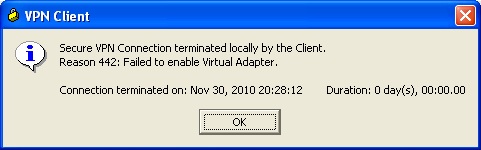
Cisco VPN – Error 442

Cisco LogoHad a user that was trying to connect to VPN using a new home computer. They installed the Cisco IPSEC VPN Client and would receive following error when they tried to connect:

I’ve had issues with the IPSEC client in the past and had the user try the Cisco AnyConnect Client. That also failed with an error message about the virtual adapter.

I had the person bring in the computer in question and I uninstalled both VPN clients, removed some directories that were left behind, and removed some registry entries. I then rebooted the pc. I installed the IPSEC client again and got the same error message.…

Upgrade Active/Failover ASA Pair

Cisco LogoAt work we have two ASA 5520’s that are configured as an active/failover pair. Here are the steps that we use to upgrade them.

  1. Download the ASA software image and the ASDM image from Cisco
  2. TFTP both files to both of the ASA’s
  3. Console directly to the Primary ASA and type the following commands:
        1. Config t
        2. Boot system disk0:/NewASAimage.bin
        3. Asdm image disk0:/NewASDMimage.bin